
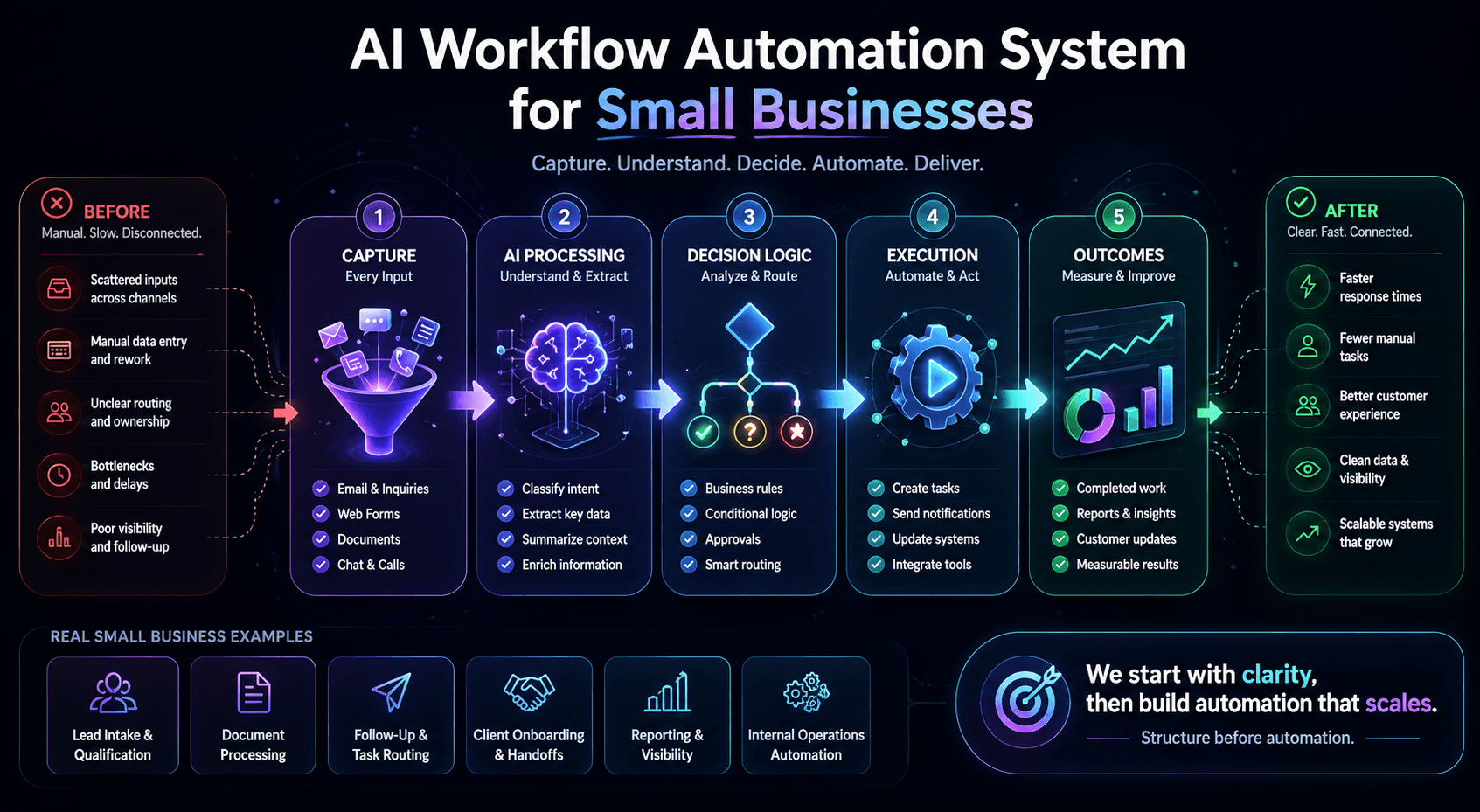
Small Business Automation
AI Workflow Automation Examples for Small Businesses
The best examples start with workflow clarity
Weak example
“AI can summarize emails, classify leads, and automate follow-up.”
That statement is technically true, but it does not show a business owner what changes operationally.
Strong example
“A service business receives inquiries from a website form, email, and social DMs. AI classifies each inquiry, summarizes the need, routes it to the correct follow-up path, and creates a clean next-step record.”
That explains the workflow, not just the feature.
Five practical AI workflow automation examples
Example 01
Local service business lead intake
Business Type
A local service business receiving inquiries through a website form, email, phone notes, and social messages.
Problem
New leads arrive in different places. Some get answered quickly, some sit in an inbox, and some depend on the owner remembering to follow up.
Before
The owner manually opens each message, copies details into a spreadsheet or CRM, writes a summary, checks for missing information, and decides what should happen next.
After
Each inquiry enters a structured intake flow. AI summarizes the customer problem, classifies the service type, flags missing information, assigns priority, and routes the lead to a follow-up path.
Expected Outcome
Faster response time, fewer missed inquiries, cleaner qualification, and less manual sorting around revenue-generating work.
LuxNovare Lens
Example 02
Document-heavy solo operator workflow
Business Type
An independent professional, freelancer, consultant, tax-prep assistant, or solo operator receiving receipts, invoices, forms, statements, and notes.
Problem
The operator spends too much time reviewing files manually, extracting details, checking whether information is missing, and creating usable summaries from scattered records.
Before
Every document is opened by hand. The operator reviews the file, pulls key information, decides how it should be categorized, and creates a manual record.
After
The intake system captures each document, AI extracts key fields, flags incomplete or low-confidence items, and prepares a review-ready summary.
Expected Outcome
Less repetitive document review, cleaner intake records, faster organization, and better visibility before the work becomes urgent.
LuxNovare Lens
Example 03
Repetitive research and application workflow
Business Type
A small team or independent operator performing repeated research, tracking, comparison, status review, follow-up, or application-style workflows.
Problem
The work requires gathering information, checking status, comparing options, writing summaries, and repeating the same decision pattern over and over.
Before
The workflow is managed through browser tabs, notes, spreadsheets, and memory. Hours are lost collecting details, copying information, comparing status, and deciding what to do next.
After
The workflow becomes a structured execution system. Inputs are captured, records are organized, next steps are generated, and repetitive review work is reduced.
Expected Outcome
Clearer tracking, faster review, less manual comparison work, and more consistent execution across repeated decisions.
LuxNovare Lens
Example 04
Customer onboarding and follow-up
Business Type
A consultant, agency, service provider, or small professional firm moving customers through intake, setup, delivery, and follow-up.
Problem
Customers submit information in different formats. The team repeats setup instructions, forgets follow-up steps, or manually checks whether required actions are complete.
Before
Onboarding depends on manual emails, copied checklists, one-off reminders, and informal task ownership. Customer experience varies by who manages the account.
After
A structured onboarding flow captures required information, summarizes customer context, triggers setup steps, assigns internal tasks, and sends follow-up reminders.
Expected Outcome
A more consistent customer experience, fewer missed steps, faster setup, and less manual coordination for the owner or delivery team.
LuxNovare Lens
Example 05
Weekly reporting and operational visibility
Business Type
A small business owner who wants better visibility into sales activity, service requests, support volume, project status, or internal operations.
Problem
Reporting happens after the fact. The owner manually checks spreadsheets, emails, task boards, and messages to understand what happened during the week.
Before
Reporting is reactive. The owner spends time gathering information instead of interpreting it. Patterns are easy to miss because the data is scattered.
After
Activity is summarized into a weekly operating view. AI highlights repeated delays, unresolved items, high-priority follow-ups, missing information, and bottlenecks.
Expected Outcome
Better decision quality, faster management review, clearer priorities, and stronger operating control.
LuxNovare Lens
Proof architecture: examples become stronger when tied to real systems
Verified System Proof
Real workflow systems prove the pattern.
The examples above map to the same operating principle visible in LuxNovare case studies: structure the workflow first, then use AI to reduce repeated manual work.
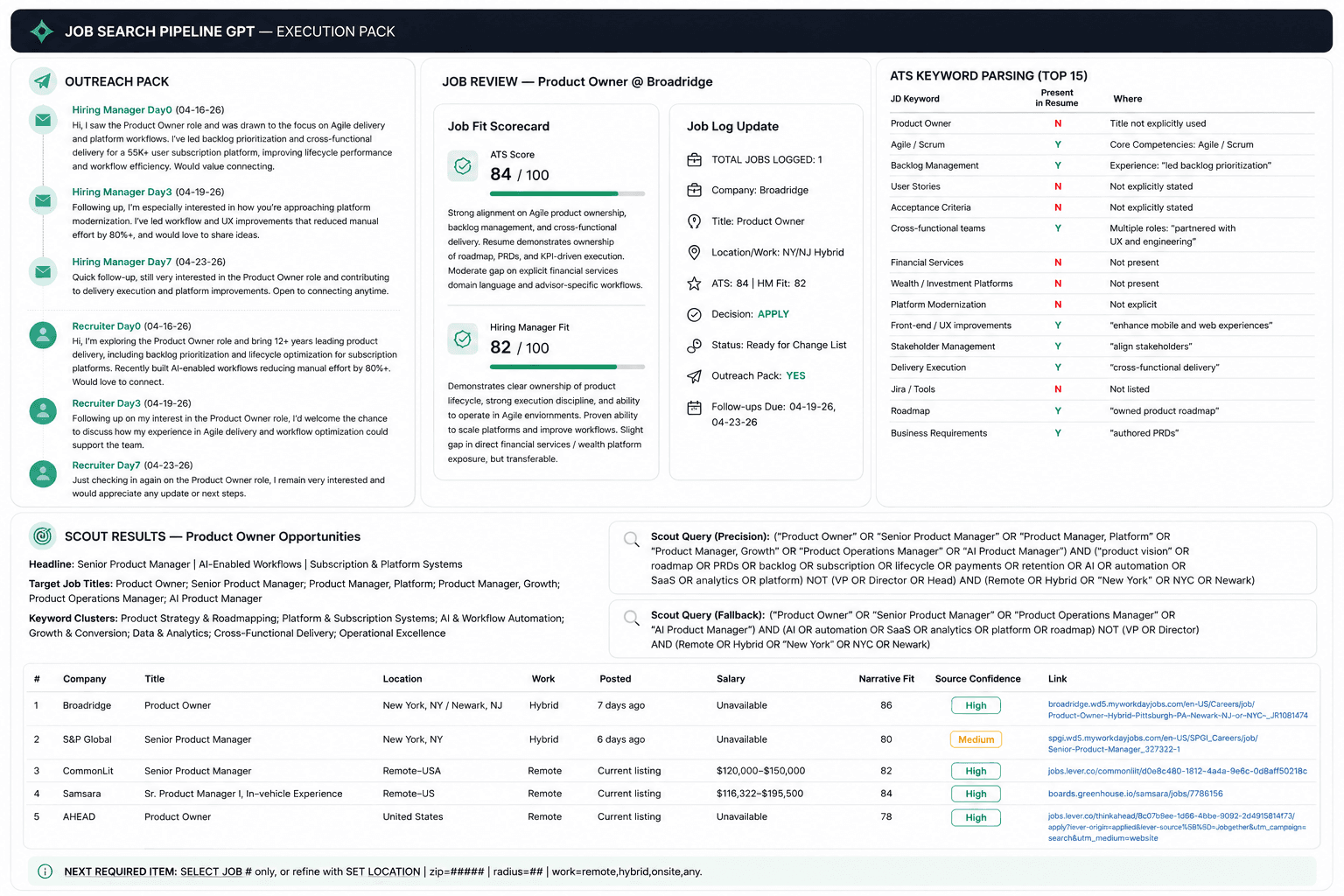
3 hrs → 30 min
Workflow compression
Verified Job Search Pipeline GPT case-study result.
5 stages
Structured execution path
Intake, scoring, packaging, execution, and tracking.
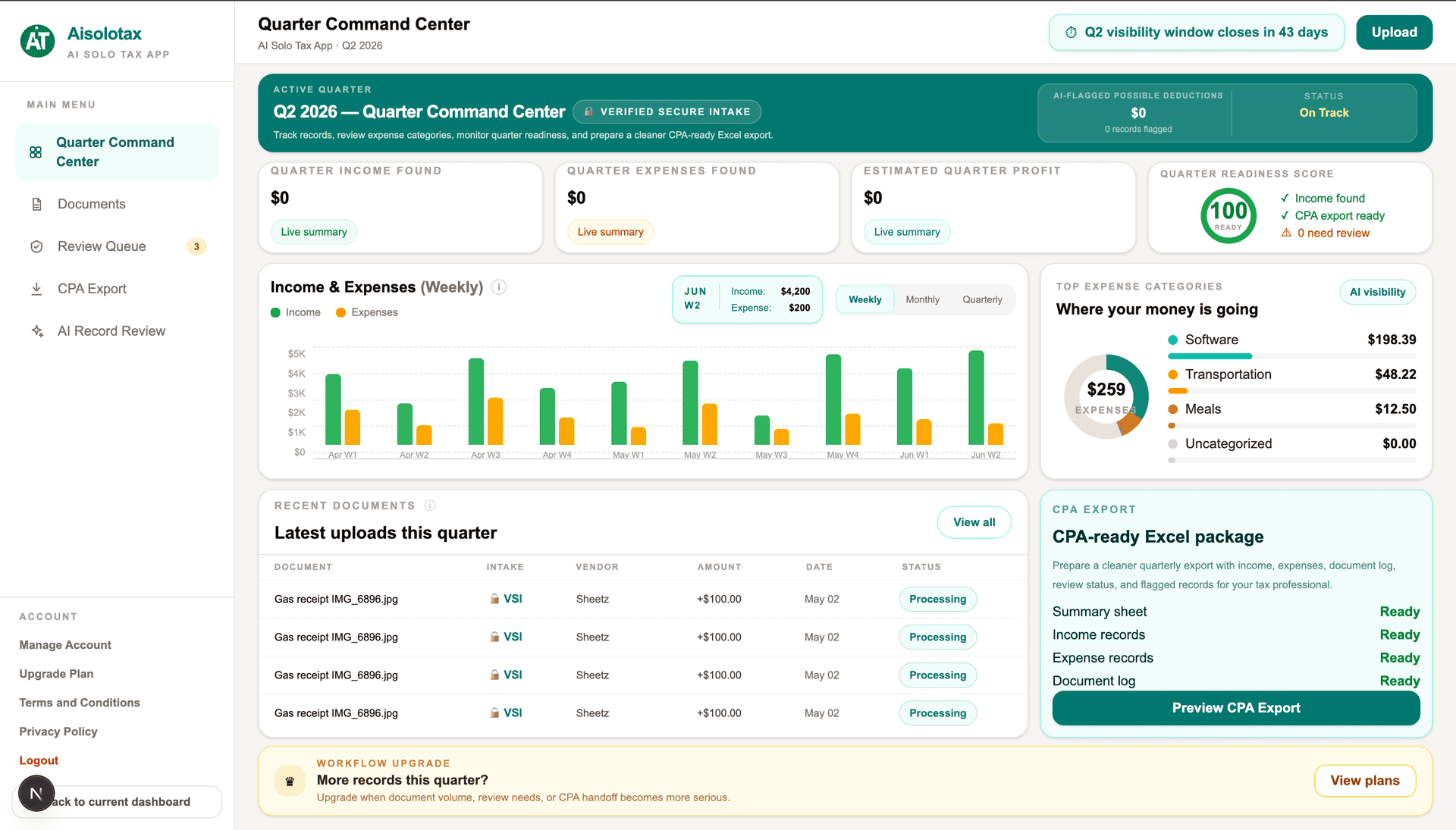
Live SaaS
Operational product proof
Aisolotax validates structured intake and visibility architecture.
Before / After
From capability list to operating workflow
Before
- •AI described as generic capabilities
- •Automation ideas disconnected from business context
- •No clear before state, after state, or expected outcome
- •Small business owner cannot see the workflow change
After
- •Business type and pain point defined
- •Manual workflow shown clearly
- •Automated workflow explained as a system
- •Outcome connected to speed, clarity, and owner capacity
What to automate first
Start with workflows that are repetitive, high-friction, and connected to revenue, customer experience, delivery speed, or management visibility.
- •Lead intake and qualification
- •Document review and summarization
- •Customer onboarding
- •Follow-up and task routing
What not to automate yet
Avoid automating workflows that are unclear, inconsistent, or still dependent on undefined judgment. Those should be simplified before automation is introduced.
- •Unclear approval paths
- •Undefined ownership
- •Messy intake with no standard fields
- •Processes no one has mapped
How to choose the right automation example for your business
Related system proof
Related LuxNovare System
Job Search Pipeline GPT
A structured execution system showing how repeated research, comparison, scoring, packaging, and tracking work can be compressed into a more controlled workflow.
Workflow Compression
3 hrs → 30 min
Related LuxNovare System
Aisolotax
A live SaaS workflow system demonstrating structured intake, AI-assisted processing, operational review, and visibility dashboard architecture.
System Type
Live SaaS
The real value is not automation. It is operating clarity.

Author
Jose Aguilar
Jose Aguilar is the founder of LuxNovare. He focuses on AI-assisted workflow systems, operational architecture, product execution, subscription platforms, and scalable business process design.
Published by LuxNovare · Workflow Systems & AI Execution
Continue Exploring
Related workflow systems and services.
Workflow analyzer
Describe your workflow and get instant automation ideas.
Add a short description of a slow, repetitive, or inconsistent workflow. The analyzer will identify likely friction points and where automation can help.
Frequently asked questions
What is a good first AI automation for a small business?
A good first automation is usually lead intake, follow-up routing, reporting, or document processing because those workflows are repetitive and easy to structure.
Should small businesses automate everything at once?
No. Small businesses usually get better results by automating one high-friction workflow first, proving the system, and then expanding.
What makes AI workflow automation different from simple automation?
AI workflow automation can classify, summarize, route, and interpret information, while simple automation usually follows fixed rules.
Continue Reading
Related workflow automation guides.
AI Automation for Small Business
Reduce manual work without creating operational chaos.
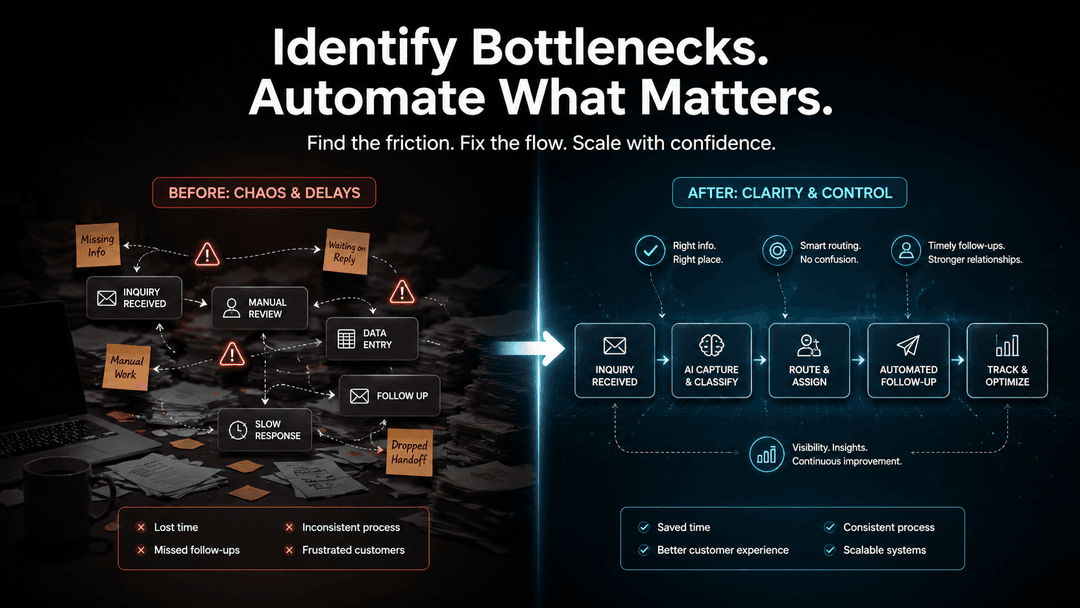
How to Identify Workflow Bottlenecks Before Automating
Find workflow friction before automation scales the wrong process.

How AI Workflow Automation Improves Business Efficiency
Use automation to improve operating speed and visibility.
Start with one workflow that creates real drag.
LuxNovare helps small businesses identify workflow friction, structure the operating logic, and design AI-assisted automation that improves execution without adding chaos.