
Small Business Systems
AI Automation for Small Business: How to Reduce Manual Work Without Creating More Chaos
Good automation starts with workflow clarity
Where small businesses lose time
Manual business workflows usually break in the same places: intake, routing, follow-up, review, and visibility.
- •Lead intake handled through email, DMs, or scattered forms
- •Customer or job data copied into spreadsheets by hand
- •Assignments managed through Slack, text, or memory
- •Follow-up delayed because no system owns the next step
- •Documents reviewed manually without structured extraction
Where AI automation can help
The best small-business automation opportunities are repetitive, operational, and connected to revenue or customer experience.
- •Classify and route inquiries
- •Summarize customer or document context
- •Trigger reminders and follow-up paths
- •Prepare review-ready records
- •Create weekly operating visibility
Three small-business automation scenarios
Example 01
Lead intake without inbox chaos
Business Type
A small service business receiving leads from a website form, email inbox, referrals, and social messages.
Problem
The owner spends time reading every inquiry, deciding whether it is qualified, writing a response, and trying to remember which leads require follow-up.
Before
Leads arrive in multiple places. Details are copied manually. Follow-up depends on memory, inbox discipline, or a spreadsheet that is only updated when someone remembers.
After
AI summarizes the inquiry, classifies the service type, flags missing information, assigns priority, and routes the lead into a follow-up path.
Expected Outcome
Fewer missed leads, faster response time, cleaner qualification, and less manual sorting around revenue-generating work.
LuxNovare Lens
Example 02
Customer onboarding without manual follow-up chaos
Business Type
A consultant, agency, local service provider, or small professional firm onboarding new customers.
Problem
The business sends the same setup instructions repeatedly, checks whether forms were completed, and manually follows up when customers miss steps.
Before
Onboarding depends on copied emails, manual checklists, scattered notes, and informal ownership. The customer experience changes depending on who manages the account.
After
The workflow captures required information, summarizes customer context, triggers setup steps, assigns internal tasks, and sends structured follow-up reminders.
Expected Outcome
More consistent onboarding, fewer missed setup steps, faster customer activation, and less owner involvement in repetitive coordination.
LuxNovare Lens
Example 03
Repeated research and tracking workflow
Business Type
An independent operator or small team managing repeated research, comparison, tracking, application, or follow-up work.
Problem
The same research and tracking pattern repeats again and again, but the workflow lives across browser tabs, spreadsheets, notes, and memory.
Before
The operator manually gathers information, compares options, tracks status, writes summaries, and decides what should happen next.
After
Inputs are captured into a structured system. AI helps summarize records, organize status, prepare next steps, and reduce repeated review work.
Expected Outcome
Clearer tracking, faster review, less manual comparison, and more consistent execution across repeated decisions.
LuxNovare Lens
Proof architecture: small teams need leverage, not tool sprawl
Verified System Proof
Small-business automation should protect owner capacity.
The strongest measurable LuxNovare proof comes from repeated workflow compression: turning a scattered manual execution process into a structured operating system.
3 hrs → 30 min
Workflow compression
Verified Job Search Pipeline GPT case-study result.
1 workflow
Best starting point
Start with one repeated workflow before expanding automation.
Live SaaS
Operational system proof
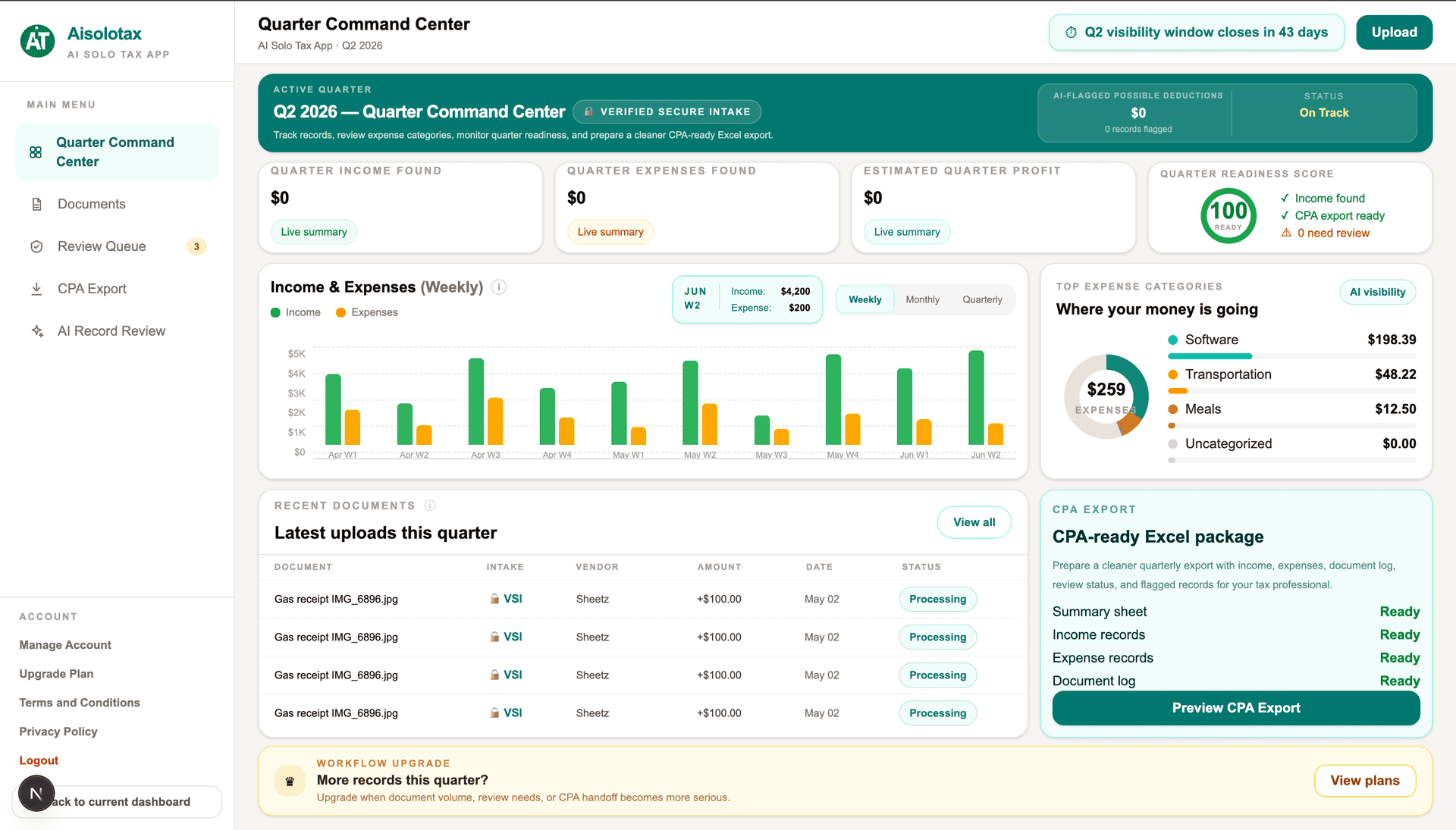
Aisolotax demonstrates structured workflow architecture in production.
Before / After
From owner-dependent work to structured execution
Before
- •Owner manually reviews every inquiry or document
- •Follow-up depends on memory
- •Customer steps vary by who handles the account
- •Reports and status updates are created manually
After
- •Inputs enter a structured workflow
- •AI helps summarize, classify, and flag work
- •Follow-up paths are defined before automation
- •Visibility improves without adding another disconnected tool
Do not automate chaos
Good first automation targets
Start with workflows that repeat often and create visible drag for the owner or team.
- •Lead intake and qualification
- •Customer onboarding
- •Document and invoice handling
- •Weekly reporting and visibility
Bad first automation targets
Avoid starting with workflows that are unclear, political, or dependent on undefined judgment.
- •Processes no one has mapped
- •Messy intake with no standard fields
- •Undefined approval ownership
- •Workflows that change every time
How small businesses should start
Related system proof
Related LuxNovare System
Aisolotax
Aisolotax demonstrates how structured intake, document organization, review visibility, and SaaS workflow architecture can reduce fragmented operational handling for independent workers.
System Type
Live SaaS
The real goal is owner capacity

Author
Jose Aguilar
Jose Aguilar is the founder of LuxNovare. He focuses on AI-assisted workflow systems, operational architecture, product execution, subscription platforms, and scalable business process design.
Published by LuxNovare · Workflow Systems & AI Execution
Continue Exploring
Related workflow systems and services.
Workflow analyzer
Describe your workflow and get instant automation ideas.
Add a short description of a slow, repetitive, or inconsistent workflow. The analyzer will identify likely friction points and where automation can help.
Frequently asked questions
Is AI automation too expensive for a small business?
Not necessarily. The right comparison is not tool cost. It is the cost of repeated manual work, errors, slow follow-up, missed handoffs, and inconsistent execution.
What should a small business automate first?
Start with the workflow that happens often, consumes meaningful time, and directly affects customer experience, revenue, delivery speed, or management visibility.
Do I need a full custom system?
Not always. But even lightweight automation performs better when it is built around structured workflow logic instead of disconnected tools.
Continue Reading
Related workflow automation guides.
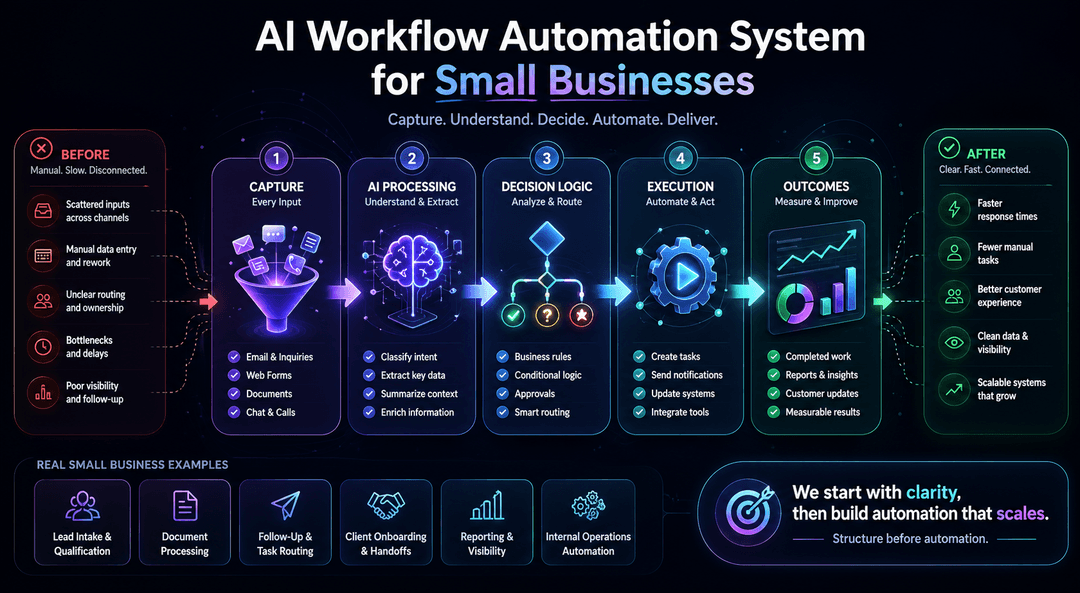
AI Workflow Automation Examples for Small Businesses
Five practical examples for small business workflows.
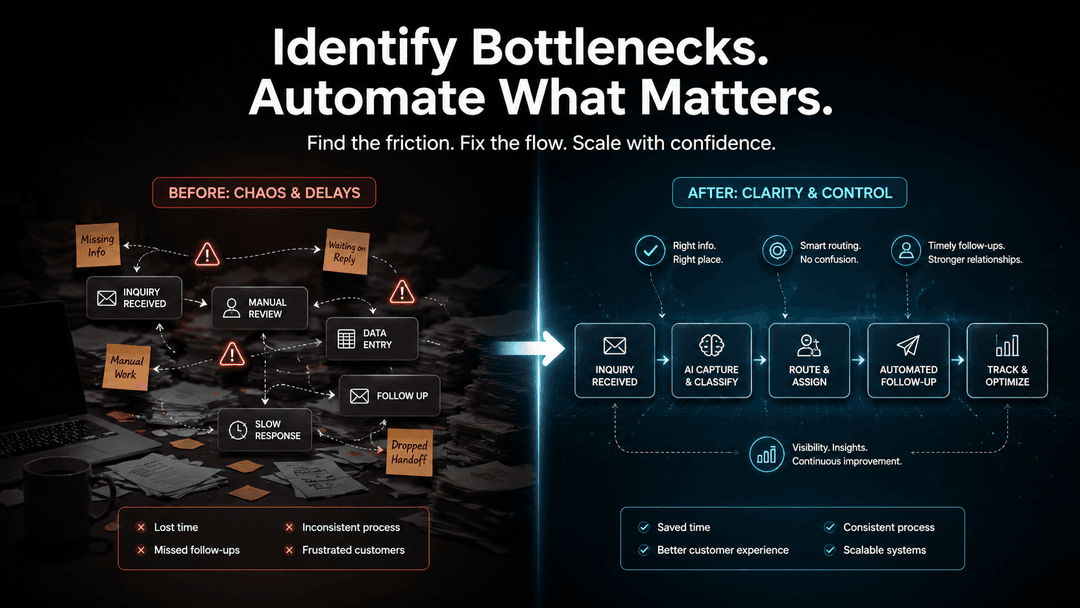
How to Identify Workflow Bottlenecks Before Automating
Clarify operational friction before automation.

How AI Workflow Automation Improves Business Efficiency
Improve speed, consistency, handoffs, and visibility.
Small business automation works when the workflow is treated like a system.
LuxNovare helps businesses redesign repetitive, inconsistent workflows into structured automation systems built for speed, clarity, and measurable value.